Voiding Agreements
Voiding cancels an agreement that's no longer needed or was sent in error. All signing links are immediately deactivated, pending recipients are notified, and the agreement is permanently closed. Voiding cannot be undone.
When to Void
Void the agreement when:
- You sent it to the wrong recipients
- The document contains an error that needs correcting
- The terms or content changed after sending
- The agreement is no longer needed
- A duplicate was sent by mistake
Don't void if a recipient is just taking longer than expected, send them a manual reminder instead.
Completed agreements cannot be voided. If an agreement is already in Completed status, the signed document is final, download it here.
How to Void
- Go to Sign > Agreements and open the agreement.
- Click Void Agreement.
- Enter a reason, recipients will see this in their notification email.
- Confirm.
The agreement status changes to Voided immediately.
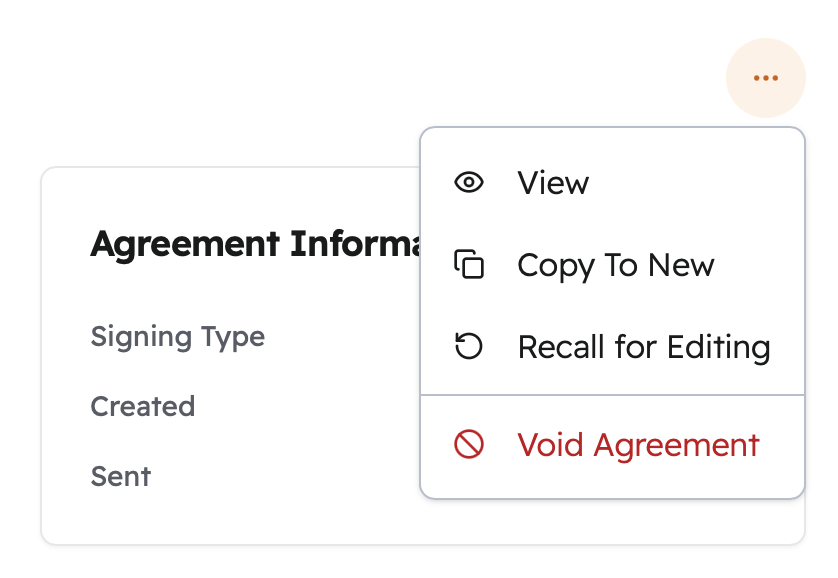
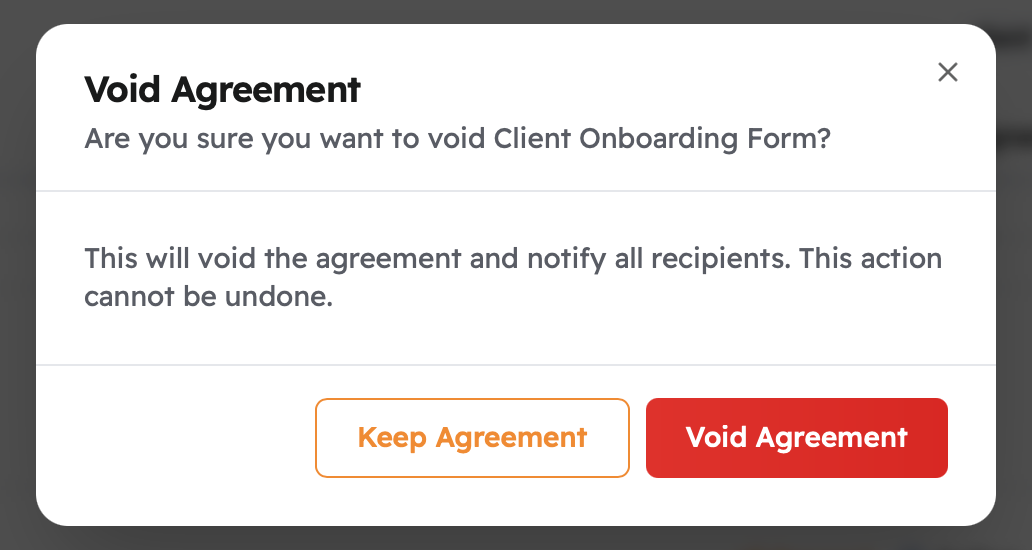
Write a clear, professional reason. Recipients see exactly what you type. "Updated agreement with corrected terms" or "Sent to incorrect recipient" is better than a vague note.
What Happens When You Void
- All active signing links stop working immediately
- Recipients who haven't signed yet receive an email letting them know the agreement has been canceled, along with the reason you provided
- The agreement stays in your dashboard with Voided status, it's not deleted
- The complete history, including who voided it and when, is preserved in the audit trail
Any signatures already collected are discarded when you void. Signers who had already signed are notified that the agreement was canceled.
Voiding vs. Declining
These are different actions initiated by different people:
| Action | Who initiates it | What happens |
|---|---|---|
| Voiding | You (the sender) | Cancels the agreement for all recipients |
| Declining | A recipient | That recipient refuses to sign, moving the whole agreement to Declined status |
If a recipient declines, you'll be notified immediately. You can then void the original and send a new agreement if needed.
Who Can Void
- The person who created the agreement
- Organization admins and members with agreement edit permissions
Once an agreement is Completed or already Voided, no one can void it.
Common Questions
Can I undo a void? No, voiding is permanent. Create a new agreement if you need to continue the process.
What about signatures already collected? They're discarded and signers are notified.
Does voiding affect my plan limits? Voided agreements don't count against your active agreement limits.
What's the difference between Voided and Expired? You actively void an agreement. Expiration happens automatically when the signing deadline passes before everyone finishes, neither you nor a recipient canceled it deliberately. If an agreement is approaching expiry, you can extend the deadline instead of voiding.
Related Topics
- Status Tracking: monitor progress and send reminders before voiding
- Notifications & Reminders: extend a deadline instead of voiding
- Audit Trail: the full record of the void action