In-Person Signing
In-person signing is for situations where the signer is physically present, a customer at a retail counter, a client in your office, or a patient at a clinic. Instead of sending a link by email, you open the signing session on your device and hand it to the signer.
How It Works
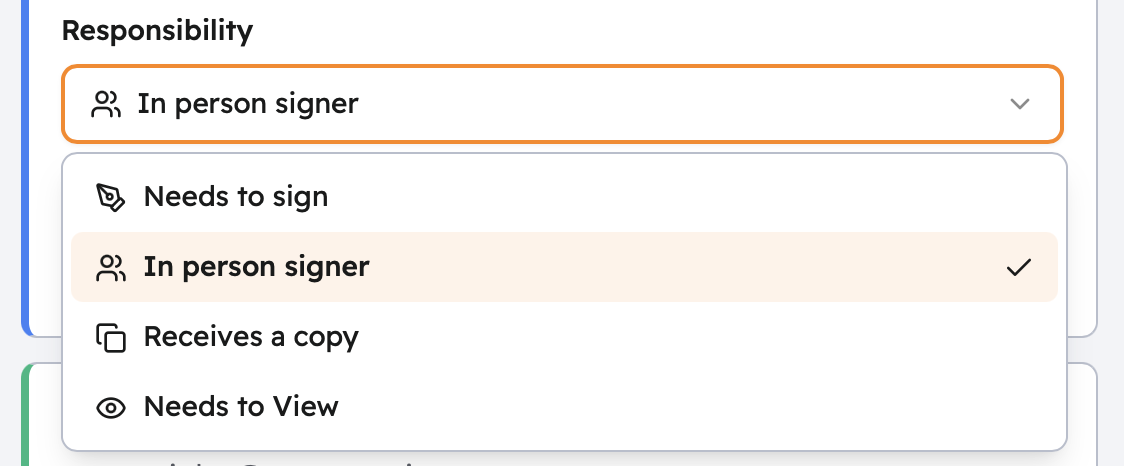
When you add an In-Person Signer recipient to an agreement, you (the host) receive the signing invitation, not the signer. You open it on your device, then pass the device to the signer to complete their portion.
- Send the agreement with the recipient type set to In-Person Signer.
- You receive an email with the in-person signing link.
- Open the link on your device and authenticate with your Propper account.
- Hand the device to the signer, they see the document and guided navigation.
- The signer completes all required tags and submits.
- Take the device back. The session ends and the document is finalized.
- The signer receives a completed copy at the email address you entered.
The host must have an active Propper Sign account. The signer does not need an account.
Setting Up an In-Person Signing Recipient
When adding a recipient to an agreement, select In-Person Signer as the role and provide:
- Signer's name and email, used to deliver the completed document
- Host's name and email, the Propper account holder who will run the session
Identity Verification
The host verifies the signer's identity before handing over the device. This is typically done by checking a government-issued ID in person.
For an additional electronic check, you can configure identity verification on the recipient, for example, requiring the signer to enter a code you provide verbally, or a code sent to their mobile number.
Combining with Other Signing Methods
In-person signers can be part of the same agreement as remote signers. Use signing order to control when each person receives their invitation, for example, an in-person signer at a branch could sign before or after a remote party signing by email.
Before and After the Session
Before handing over the device:
- Verify the document and all pages load correctly
- Confirm the signer's identity using ID or another accepted document
- Briefly explain what they need to do
After the signer finishes:
- Confirm the completed copy was sent to their email address
- If this is a shared or public-facing device, log out before walking away
Troubleshooting
You can't access the signing link, Check that the host email on the agreement exactly matches your Propper account email. The sender can resend the notification from the agreement detail page.
Session expired, Signing sessions expire after 7 days. If the session has expired, void the agreement and send a new one.
Signature looks jagged, Suggest the signer use the Type option instead. It generates a clean script-font signature from their typed name.
Related Topics
- Identity Verification: add electronic verification for in-person signers
- Signing Order: control when each recipient is notified
- Signature Types: draw, type, or upload options
- Audit Trail: the full record of the signing session